Recruiters almost always look you up on LinkedIn. Putting your profile link on your resume saves them the search, makes sure they find the right person, and shows confidence in your profile. Here is how to do it properly.
Where to put it
In your contact section, at the top of the resume, with your email, phone and city:
Jane Doe Product Manager · Austin, TX jane.doe@email.com · (555) 123-4567 · linkedin.com/in/janedoe
Do not bury it at the bottom or in a separate “Links” section; recruiters look for contact details at the top.
Examples for different layouts
Stacked, for a narrow sidebar or when you have several links:
Sam Lee Data Analyst Toronto, ON sam.lee@email.com linkedin.com/in/samlee-data github.com/samlee
With a portfolio, for designers, writers and developers. Put the portfolio first: it is the link you most want opened.
Maria Garcia · Brand Designer · Madrid, Spain mariagarcia.design · linkedin.com/in/mariagarcia · maria.garcia@email.com
Early career, when you have no phone you want to share or no portfolio yet. LinkedIn still fits on the same line:
Alex Johnson · Austin, TX alex.johnson@email.com · linkedin.com/in/alexjohnson
Whatever the layout, write the address itself. Some templates show only the word “LinkedIn” as a link: it looks tidy on screen, but on a printed copy or in an applicant tracking system the address is lost.
Use a clean custom URL
LinkedIn gives you a default URL with random numbers at the end. A custom one looks better and is easier to type:
- Open your LinkedIn profile.
- Choose Edit public profile & URL (on desktop it sits on the right of your profile).
- Edit your custom URL. Use your name, or add a middle initial or your profession if your name is taken:
linkedin.com/in/jane-doe-pm.
LinkedIn may change these labels from time to time, but the option is always under your public profile settings.
The right format
- Short:
linkedin.com/in/janedoe. Drophttps://andwww. - Clickable in the PDF, so recruiters can open it straight away.
- Same font and size as the rest of your contact details.
- No logo needed. A plain, readable link is enough.
Common mistakes
- The default URL, with numbers at the end such as
linkedin.com/in/jane-doe-4b7a91203. It works, but it looks unfinished. - A share link from the app. Links copied from the LinkedIn app often end in
?utm_source=share…. Cut everything from the?onwards. - A link to the wrong page, copied while editing your profile or viewing your activity, with extra parts after your name. Your link should end right after your name.
- A link you never tested. Click it in the final PDF, ideally from a browser where you are not signed in to LinkedIn, to see what a recruiter sees.
Make the profile worth the click
A link only helps if what is behind it is strong. Before you add it, check that your profile:
- Has a clear headline, not only your job title.
- Has an About section that matches your resume summary.
- Shows the same job titles and dates as your resume.
- Lists your key skills, with the most important ones as top skills (see skills to put on a resume).
- Has a professional photo and a simple banner.
Just starting out? A short profile with your education, projects and volunteering is fine; see how to make a resume with no experience for what to include.
Building the resume from your profile? LinkedIn to resume lays out your LinkedIn PDF as a one-column resume, with your profile address in the contact line, ready to edit and download.
Add a Pixel CV to your Featured section
The first thing a recruiter sees when they land on your profile is your header and Featured section. A Pixel CV, a 16-bit, RPG-style card of your experience, is an eye-catching thing to put there: it sums up your level, roles and skills at a glance and gives people something to remember you by.
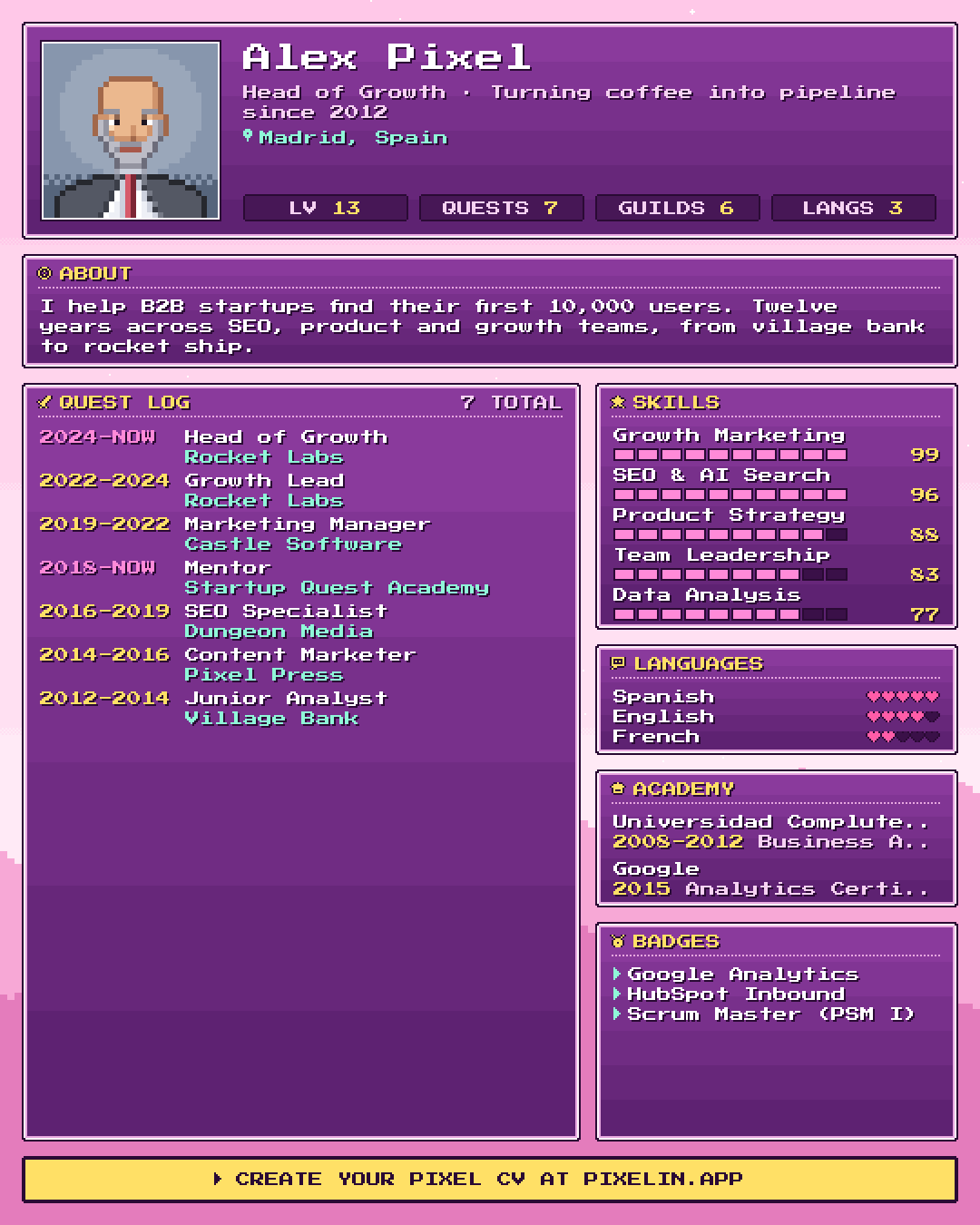
Drop your LinkedIn PDF into Pixelin, download the image and add it to Featured. Here is how to add files to your LinkedIn profile.
FAQ
Should I put my LinkedIn URL on my resume?
Yes, if your profile is up to date and consistent with your resume. Recruiters often check LinkedIn anyway, so a link saves them a search and shows you have nothing to hide.
Where does the LinkedIn link go on a resume?
In the contact section at the top, next to your email and phone number.
Should I write https://www. before my LinkedIn URL?
No. linkedin.com/in/yourname is shorter, cleaner and still works. In a PDF, make it a clickable link.
How do I get a custom LinkedIn URL?
Open your profile, choose the option to edit your public profile and URL, and edit your custom URL. Use your name, or your name with a middle initial or profession if it is taken.
What if my LinkedIn profile is empty?
Fill in at least your headline, About section, experience and skills before you add the link. An empty profile does more harm than no link at all.

Written by
On the internet since 1995 and launching online products since 2009, from one of the first app marketing agencies to tools like Pixelin. Writes about LinkedIn, resumes and standing out online.