
Recruiters often spend just a few seconds on a first look at a resume. In that time they decide whether to keep reading. Standing out is less about fancy design and more about making it obvious, fast, that you fit the role. Here are 12 ideas that work, roughly in order of impact.
1. Tailor it to every job
The single biggest improvement. Read the job description, pick the three or four things it asks for most (our resume examples by job show what that looks like for 50 roles), and make sure your resume shows them near the top: in your summary, your most recent role and your skills. A generic resume reads like a generic candidate.
2. Lead with a sharp summary
Two or three lines under your name that say who you are, what you are best at and what you want next. For example: “Growth marketer with 8 years in B2B SaaS. Took two startups from zero to $1M ARR. Looking for a Head of Growth role.” Skip vague lines like “hard-working team player”. For an even quicker first impression, add a one-line resume headline right under your name.
3. Show results with numbers
“Responsible for social media” says nothing. “Grew Instagram followers from 2,000 to 40,000 in a year” says a lot. Numbers stand out on the page and prove impact: revenue, growth, time saved, people managed, budgets, rankings. The best time to collect them is before you leave a job, while you still have access to the dashboards (more in how to leave a job on good terms).
4. Start bullets with strong action verbs
Led, built, launched, grew, cut, negotiated, automated. Each bullet should describe something you did and what came of it, not a list of duties. See how to describe work experience for before-and-after examples.
5. Use the job’s own keywords
Many companies screen applications with an applicant tracking system (ATS). Use the same words the job description uses for the skills you really have, such as “project management” rather than only “PM”. It helps both the software and the human reading after it.
6. Make it easy to scan
Clear headings (Experience, Education, Skills), consistent dates, plenty of white space and one readable font. If a recruiter cannot find your last job title in two seconds, fix the layout before anything else. Designers can push the look further, within limits: see the graphic designer resume guide.
7. Keep it to one or two pages
Cut roles from long ago that are not relevant, merge similar bullets and drop old details. Shorter usually reads stronger.
8. Add proof people can click
Links to a portfolio, GitHub, published work, a case study or your LinkedIn profile let a recruiter check your work in seconds. Make sure every link works.
9. Put your best skills where they are seen
A short skills section with the tools and abilities the job asks for, not every program you have ever opened. Mention the most important ones again inside your experience bullets, where they have context.
10. Match your LinkedIn profile
Recruiters almost always check LinkedIn. The same job titles and dates on both build trust, and a strong profile backs up your resume. If your profile is in good shape, LinkedIn to resume turns it into a clean, one-column draft in a minute, with titles and dates that already match. For other ways, see how to turn your LinkedIn profile into a resume.
11. Name the file properly
Jane-Doe-Product-Manager-Resume.pdf beats resume_final_v3.pdf. Send a PDF unless the company asks for another format, so the layout stays as you designed it.
12. Get noticed before you apply: share a Pixel CV
Everything above makes your resume stronger once someone opens it. The hard part is often getting seen at all. That is where a visual version helps: a Pixel CV turns your LinkedIn profile into a 16-bit, RPG-style character sheet you can share in a LinkedIn post or add to your profile.
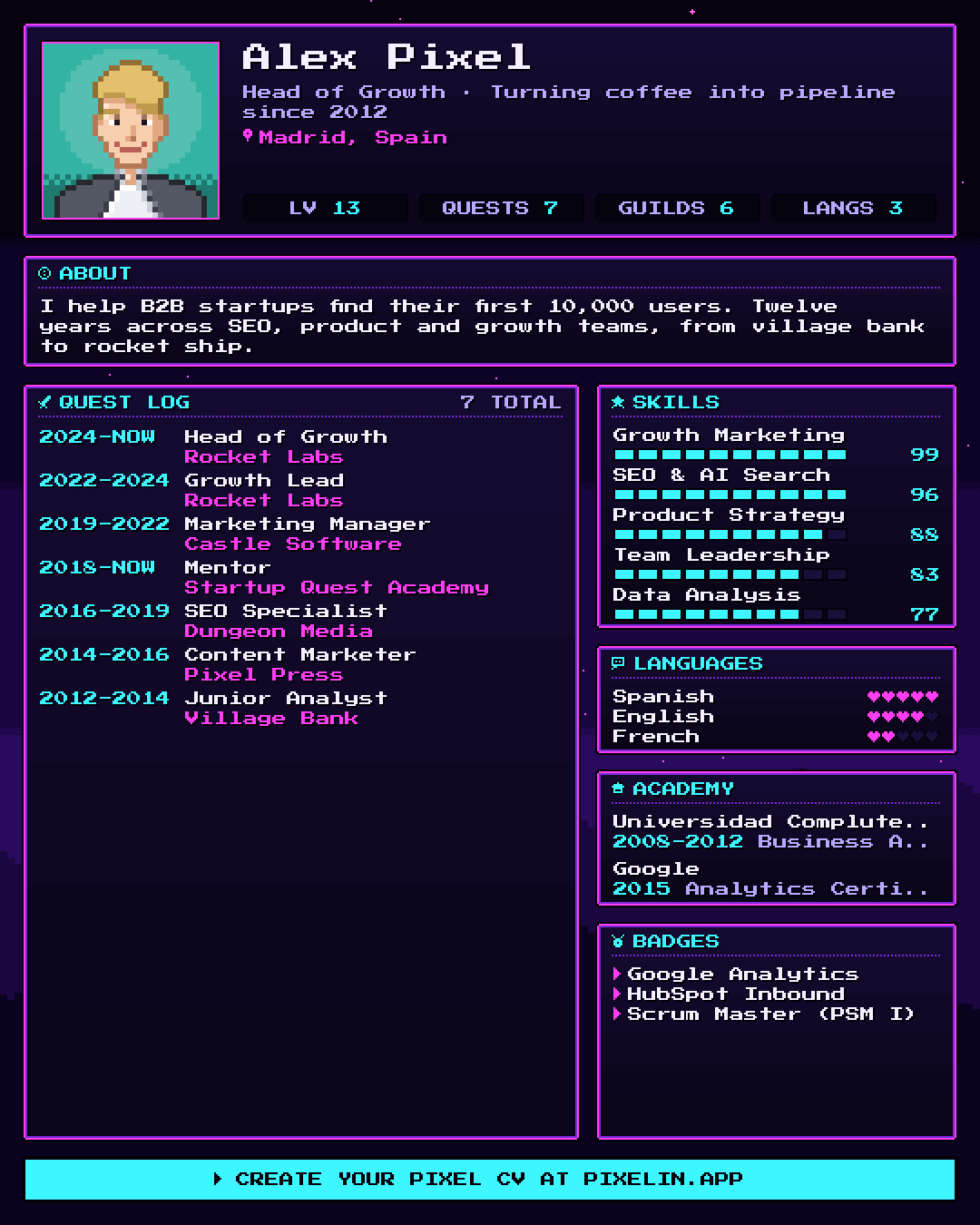
It works because it is unexpected in a feed full of text: your years of experience become your level, your roles a Quest Log and your skills stat bars. People stop, look and comment, and recruiters and hiring managers in your network see it too.
To make one, drop your LinkedIn PDF into Pixelin, pick an avatar or your own photo and a style, and download the image.
Keep it as a companion, not a replacement: send your classic resume when you apply, and use the Pixel CV to start conversations.
A quick checklist
- Tailored to this job, with its keywords
- Clear summary in two or three lines
- Results with numbers in most bullets
- Easy to scan, one or two pages
- Links that work, file named properly
- LinkedIn profile that matches
And outside the resume, a Pixel CV on LinkedIn so people see you before they see your application.
Wondering whether you need a resume or a CV for a role abroad? Read CV vs resume: what’s the difference?
FAQ
What makes a resume stand out to recruiters?
Relevance and proof. A resume stands out when it is clearly tailored to the role, shows results with numbers, and is easy to scan in a few seconds. Design helps only after that.
Should I use a creative or colorful resume?
For online applications, keep it simple so applicant tracking systems can read it. Save the creativity for where people, not software, will see it, such as a portfolio, your LinkedIn profile or a visual Pixel CV you share in a post.
How long should a resume be?
One page for most people early in their career, two pages if you have many years of relevant experience. Academic CVs are the exception and can be much longer.
Does a Pixel CV replace my resume?
No. A Pixel CV is a shareable image that gets attention on LinkedIn. Keep a classic text resume for job applications and use the Pixel CV to get noticed.
Is Pixelin free?
Yes. Pixelin is free, needs no sign-up and works in your browser. Your LinkedIn PDF and your photo never leave your device.

Written by
On the internet since 1995 and launching online products since 2009, from one of the first app marketing agencies to tools like Pixelin. Writes about LinkedIn, resumes and standing out online.